Seahaven Towers


Try Seahaven Towers online
Seahaven Towers is a solitaire card game similar to Free Cell.
- Play Seahaven Towers in your browser!
This requires a modern browser with JavaScript enabled. The page should be mobile friendly. Your browser can also install it as an app, on a phone with "Add to Home Screen"; it then runs in its own window and works without a network connection. - Get the source code!

Rules
The cards are initially dealt out into 10 tableau piles holding 5 cards each and the remaining two cards are dealt to the reserved cells. There are four reserved cells total, each can hold at most one card. The object of the game is to move all cards to the foundations (at top left and right) from Ace to King by following suits.
On the tableau piles you can build down from King to Ace following suit, the reserved cells can hold any card, but only one. Empty tableau piles may hold kings. You can move the cards only one by one. Only the lowest card from the tableau piles and the cards on reserved cells are available.
You just have to say which card to move, and the program will automatically determine the destination: the foundations, a tableau pile, or the reserved cells, in that order.
How much else the program does for you is selected in the option box that the Options button opens; while it is open the key a steps through the levels:
- None: Only the lowest card of the clicked pile is moved and nothing happens automatically.
- Flutes: When moving cards from the tableau piles it will move all cards of the current suit that follow in sequence, as long as there is enough space in the reserved cells. If the whole sequence does not fit anywhere, as many cards as the reserved cells can hold are moved there.
- Aces: It will also move all cards to the foundations as soon as they get available.
- Full: It will also move all matching cards from the reserved cells back to the tableau piles.
When you switch to a higher level, the moves it makes by itself are made right away. The option box also switches the fullscreen mode on and off. It closes again when you click on the Options button or anywhere else on the board.
The game remembers every single card move, also the ones it made for you. Undo takes back one move of the level you have selected: the moves the level makes by itself are taken back together with the click that caused them, and they are made again for the position you land on. On a lower level undo walks back card by card, so with the automation switched off you can see how a sequence was moved through the reserved cells.
Starting a new game can be taken back, too: when there is nothing left to undo in the current game, undo returns to the game you played before it, and redo brings you back. The last five games are kept, the older ones are forgotten.
If you think you're stuck you can check if the game is still solvable. It will give you a tick or a cross as an answer. If you're stuck you can undo your moves to a position where the tick appears; the tick or cross will update for every move. If you're stuck on the initial position that game had no solution. Click the check button again to hide the tick/cross.
About one deal in ten cannot be won at all. With the Ensure solvable option of the option box every new game is tested and dealt again until the solver finds a solution. The setting is used for the next new game; the game on the board stays as it is.
Credits
The game uses Adrian Kennard's playing cards. The animated gears are from Garey Simpson's CodePen. The tick and checkbox icon are from the Open Clipart library: The cross is by gcross, the tick is by Kliponius.
Seahaven Towers for Pocket PC and Palm (old)
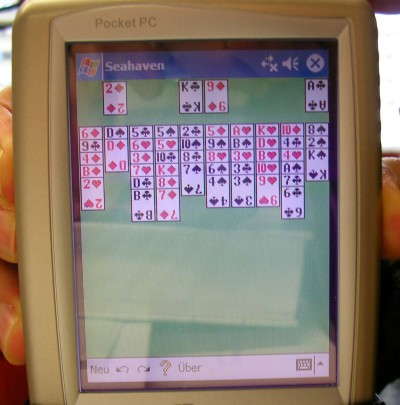
The Palm version is black and white only and does not support high resolution. Feel free to update the game if you like...
Download
You can download Seahaven as source or binary. To compile the Palm sources you need the GNU compiler tools: prc-tools, gcc, binuitls, pilrc. These can be downloaded from the PRC-Tools website at sourceforge. To compile the Pocket PC sources you need Embedded Visual C++ 4.0 and Pocket PC 2003 SDK. These can be downloaded from the Microsoft Web Site for free. Unfortunately they are only available for Windows.
- Seahaven-ARM.exe (25 KByte)
- Seahaven-ARM.zip (11 KByte)
- Seahaven-PPC-src.tar.gz (25 KByte)
- Seahaven-Palm-src.tar.gz (21 KByte)
- Seahaven-Palm.zip (21 KByte)

License
This program is free software; you can redistribute it and/or modify it under the terms of the GNU General Public License as published by the Free Software Foundation; either version 2 of the License, or (at your option) any later version.
This program is distributed in the hope that it will be useful, but WITHOUT ANY WARRANTY; without even the implied warranty of MERCHANTABILITY or FITNESS FOR A PARTICULAR PURPOSE. See the GNU General Public License for more details.